Backup Otomatis. Rollback 1-Klik. Tenang Update WordPress.Automatic Backups. One-Click Rollback. Update WordPress Worry-Free.
Backup file + database otomatis sebelum setiap update WordPress. Kalau situs bermasalah setelah update — pulihkan dengan satu klik. Anti "situs down setelah update".
Automatically backs up your files + database before every WordPress update. If your site breaks after an update — restore with one click. No more "site down after update".
Semua yang Anda Butuhkan untuk Update Aman
Everything You Need for Safe Updates
Backup Otomatis
Automatic Backup
Snapshot file + database dibuat otomatis sebelum update plugin, tema, atau core.
File + database snapshots created automatically before any plugin, theme, or core update.
Rollback 1-Klik
One-Click Rollback
Situs bermasalah? Pulihkan ke kondisi sebelum update dengan satu klik.
Site broken? Restore to the pre-update state with a single click.
Restore File + DB
File + DB Restore
Pulihkan wp-content dari arsip zip dan database dari dump SQL, utuh.
Restore wp-content from zip archive and database from SQL dump, intact.
Aman dari Zip-Slip
Zip-Slip Protected
Validasi path per-entry, tolak traversal. Backup korup tidak bisa keluar dari wp-content.
Per-entry path validation, traversal rejected. Malicious archives can't escape wp-content.
Ringan & Cepat
Lightweight & Fast
Tanpa dependensi eksternal, tanpa bloat. Backup selesai dalam hitungan detik.
No external dependencies, no bloat. Backup completes in seconds.
Dashboard Admin
Admin Dashboard
Kelola backup & rollback langsung dari menu dashboard WordPress.
Manage backups & rollbacks right from the WordPress dashboard menu.
Kelola Semua Backup dari Satu Dashboard
Manage All Backups from One Dashboard
Lihat daftar backup, ukuran file, versi WP, dan tombol rollback langsung dari menu Tools.
View backup list, file size, WP version, and rollback buttons right from the Tools menu.
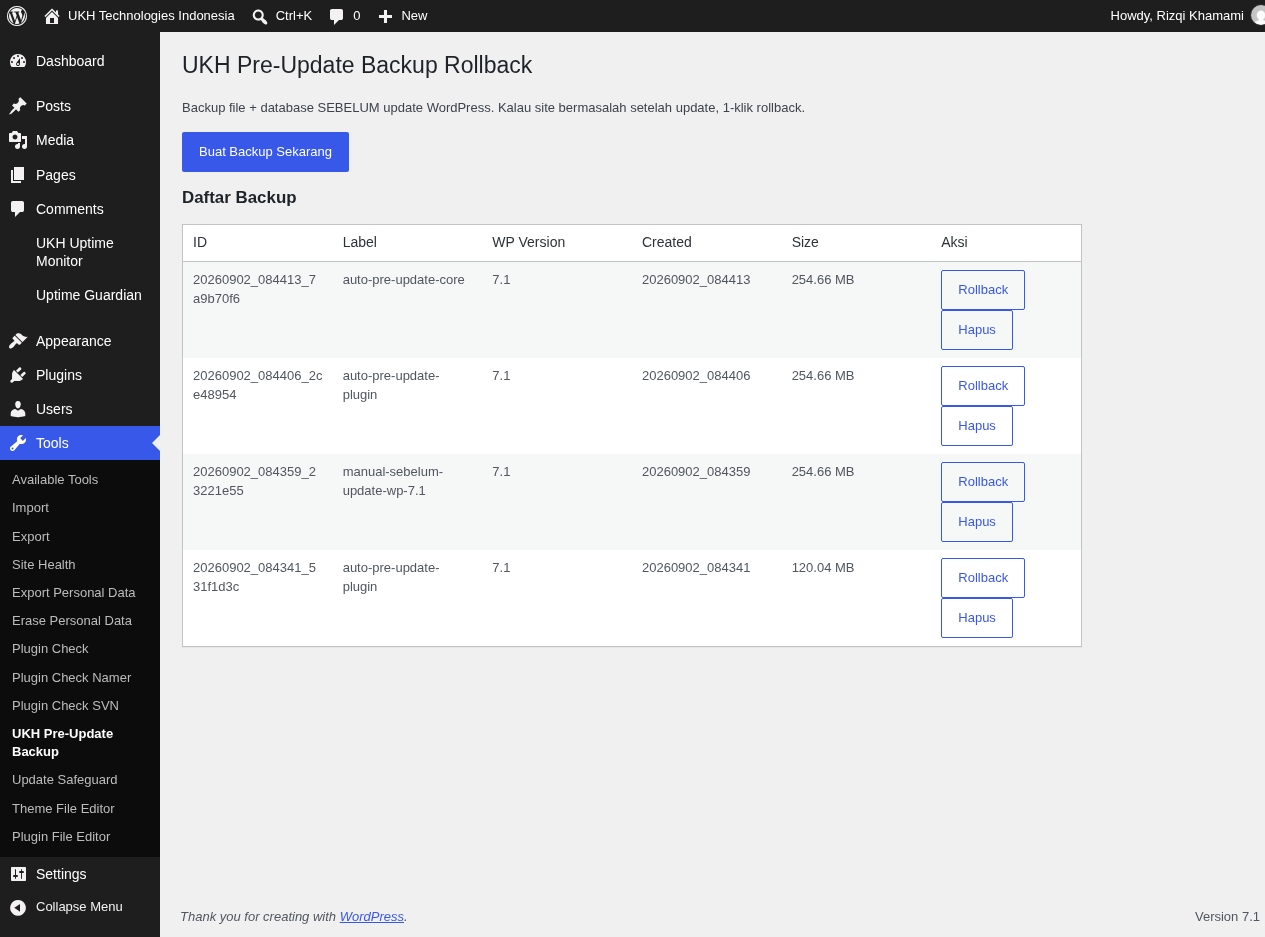
Dashboard backup dengan daftar snapshot, ukuran, versi WP, dan tombol Rollback
Backup dashboard showing snapshots, size, WP version, and Rollback buttons
3 Langkah Menuju Update yang Aman
3 Steps to Safe Updates
Install & Aktifkan
Install & Activate
Pasang plugin dari menu Plugins → Add New, lalu aktifkan.
Install from Plugins → Add New, then activate.
Update Seperti Biasa
Update As Usual
Plugin otomatis membuat backup sebelum setiap update.
The plugin automatically backs up before every update.
Rollback Jika Perlu
Rollback If Needed
Ada masalah? Klik Rollback — situs kembali normal.
Something wrong? Click Rollback — your site is back.
Pertanyaan Umum
Frequently Asked Questions
Apakah backup benar-benar otomatis?
Is the backup really automatic?
Berapa lama proses restore?
How long does restore take?
Apakah kompatibel dengan PHP 8.x?
Is it compatible with PHP 8.x?
Apakah backup disimpan di server eksternal?
Are backups stored on an external server?
wp-content/upbk-backups/. Privasi penuh, tanpa cloud pihak ketiga.wp-content/upbk-backups/. Full privacy, no third-party cloud.Bagaimana keamanan dari zip berbahaya?
How is it protected from malicious zips?
Apakah gratis selamanya?
Is it free forever?
🔒 Komitmen PrivasiPrivacy Commitment
- Tanpa pelacakan pengguna
- No user tracking
- Tanpa data ke server eksternal
- No external data transfer
- Tanpa cookie
- No cookies
- 100% open source (GPLv2+)
- 100% open source (GPLv2+)
Siap Update WordPress Tanpa Rasa Cemas?
Ready to Update WordPress Without Fear?
Download gratis sekarang. Backup otomatis berjalan sejak plugin aktif.
Download free now. Automatic backups start the moment the plugin is active.
⬇ Download dari WordPress.orgDownload from WordPress.org